What to expect
Don't be discouraged if very few people take your calls. Out of fifty calls it is normal for only a handful — or fewer — to actually talk to you. That is not a bad shift. That is the shift.
The voicemails you leave matter: they put Sam's name in front of voters. So do the wrong numbers and disconnects, which clean up the list for everyone calling after you. It has been shown over and over that making these calls changes election outcomes.
Before you start
What you need
- A computer — not a phone or a tablet. The dialer runs in the browser.
- Headphones or a headset, plugged in or paired over Bluetooth before you begin. Switching audio mid-session drops the call.
- Google Chrome. The dialer is built for it, and sorting out a different browser at the start of your shift costs you the shift.
- Your user name and password, which are in your confirmation email. Everyone calling at the same time gets a different user name, so use the one sent to you rather than one a friend passed on — two people on the same account locks the second one out.
Worth ten minutes beforehand
Read Sam's bio and reason for running, and have a look at the website — the Home, Vision and More About Sam pages between them give you her background and the issues she's running on.
You don't need all of it at your fingertips. Often this is enough:
Sam is a centrist Democrat looking to bring a local perspective to Hartford and address affordability.
Signing in
- Go to phoneburner.com.
- Press Log In, top right.
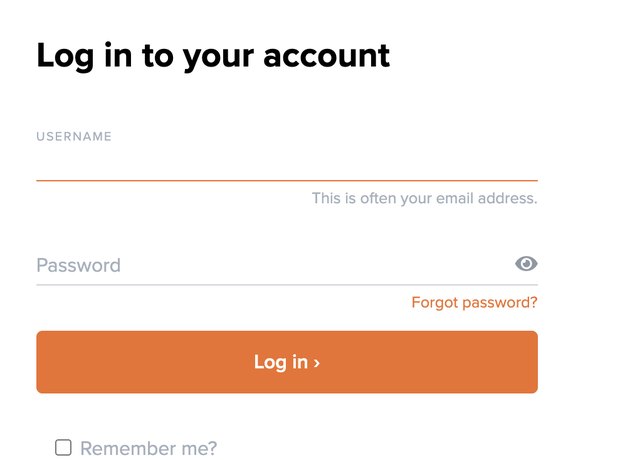
Steps 2 and 3 — the sign-in form. - Enter the user name and password from your confirmation email.
If it won't let you in, it is almost always a typo or somebody else already on that account. Check the email again before anything else.
- You may be asked for a cell phone number, twice. Enter 646-247-5459 — the system needs a number to place the calls from. If you aren't asked, carry on.
Choosing a town
- On the black bar at the top, next to Contacts, press Leads.
Not the folders down the left-hand side — those are for the campaign's own sorting and will not give you anybody to call.
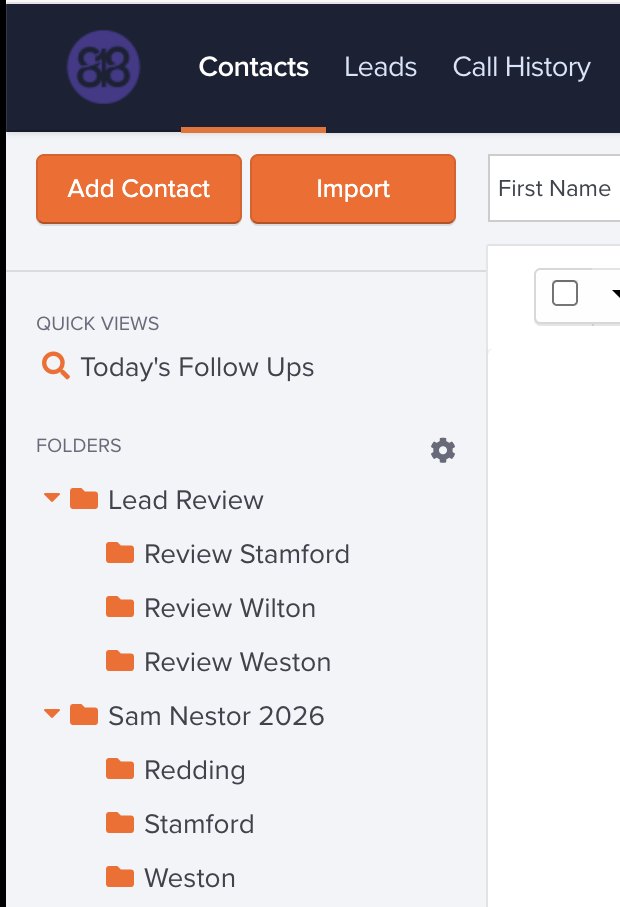
Step 5 — Leads on the top bar. Everything below it is the campaign's own filing; none of it gives you people to call. - A new page opens. There may be an overview video in the middle —
ignore it, or close it with the × in the corner. The towns are at
the bottom left under LEADSTREAMS: Stamford, Redding,
Wilton and Weston. Pick the one you want to call.
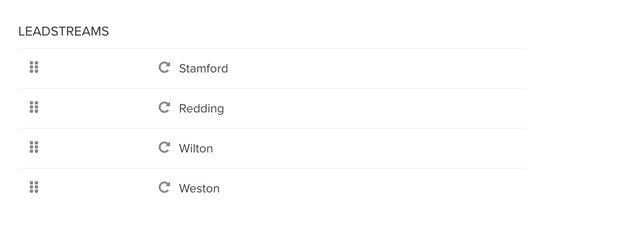
Step 6 — the four towns. - Picking a town loads a batch of people for you — how many is the
second figure under TOTAL LIMIT. Press the orange
Begin Dial Session bar.

Step 7 — pick a town and the orange Begin Dial Session bar appears.
Starting the dialer
- A box asks to use your microphone. Press the orange
Grant Mic Access.
If nothing happens when you press it, Chrome has already blocked the microphone for this site. Click the icon at the left-hand end of the address bar, set Microphone to Allow, and reload the page.
- A voice tells you you're ready. Press Start, top right. If it doesn't dial the first person, press Dial at the bottom.
What happens on a call
One of four things. None of them is a problem.
A recorded screener answers
It asks your name and why you're calling. Say:
This is (your name) calling from Sam Nestor's campaign.
It then goes to see whether the person will take your call.
- They pick up — go to what to say.
- You're offered voicemail — press the green Voicemail button at the bottom. The dialer leaves Sam's recorded message for you.
An answering machine picks up
Press the green Voicemail button at the bottom. Sam's message is left automatically — you don't have to speak.
A person picks up
Go to what to say.
Silence, or ringing and then nothing
Look at the bottom of the screen — there will usually be a pink line saying the call can't be connected. Press Wrong Number.
This is the single most common outcome and it is genuinely useful: it is how the list gets cleaned up.
What to say
Not a script to read out. The shape of a conversation:
Hi, is this (name)?
- When they say yes:
This is (your name) calling from Sam Nestor's campaign. Sam is a Democrat running for the State Senate representing (their town). How are you today?
Pause. Let them answer.
I'm calling today to see what issues you care about in the upcoming election, and whether you'll support Sam.
- Then just have a conversation. Two things to make sure you get to:
- Ask whether they'll support Sam by voting Row A on the ballot.
- Encourage a voting plan. They can vote absentee right now, vote early from October 19, or vote on election day, November 3.
Ending the call
- If you hang up first, press Live Call at the bottom, then End Call, then pick the outcome that fits.
- If they hang up first, the outcome buttons appear on their own.
- If they weren't interested or didn't want to talk, press Not Interested.
If someone asks to be taken off the list, say of course, and mark the call so we can honour it. Nobody has to argue with anybody.
Finishing up
Between calls
After each call, press Dial at the bottom of the screen to reach the next person.
Taking a break
Press Pause Dialing, top right, whenever you like. To start again: Begin Dialing above the name calls the person on screen; Continue Dialing or Dial at the bottom moves on to the next one.
If it seems to call the same person twice
Look above the name at the top left — there's more than one number for them, and the dialer tries each. If the numbers are the same, or you already got through, skip ahead.
When your batch is done
Either go back to Leads and pick another town for a fresh batch, or close PhoneBurner and walk away. Both are fine — you are not expected to finish a whole batch in one 90-minute slot.
Didn't get through them? They go back into the town's folder for somebody else.
At the end of your slot
Log out. The user names are shared between time slots, so staying signed in locks out whoever is calling after you.
Trouble?
Bob Smoler — robert.smoler@gmail.com or 203-856-0524.
Haven't booked a time yet? Sign up for a slot.